OfferBasic Plus: 3 vCores and 6 GB of RAM for €42.70 €48.80 a monthSee plans →

Choose a plan

Forex VPS for MetaTrader and cTrader: your Expert Advisors stay online 24/7

A Windows desktop that never switches off, in a European data centre. Install MT4, MT5 or cTrader from your own broker and let your EAs, signals and trade copiers work while your PC is off, with at least 4 GB of RAM even on the smallest plan.

See the plans
  • From €18.30 a month, VAT included
  • Windows Server 2022
  • 99% uptime SLA
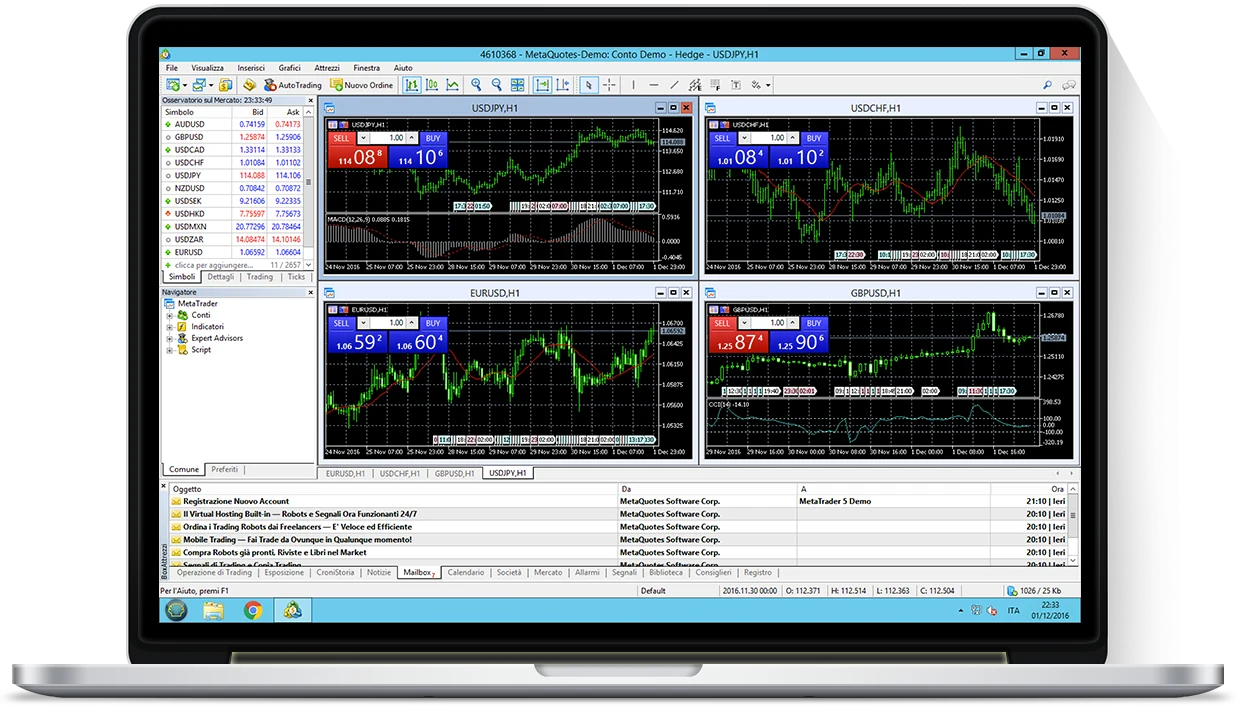
MetaTrader 5 with four charts running on a Hosting Stak Forex VPS, viewed over Remote Desktop on a laptop
PC offyour EA keeps trading
MT4 and MT5restart on their own

Auto-startMT4 and MT5 come back after every reboot

Any EA, any brokerNo limits on what you install

4 GB of RAM or moreWhat MT5 actually needs

Euro prices, VAT includedMonthly, by PayPal or bank transfer

Forex VPS plans

Four plans, from a single terminal to eight MetaTraders at once.

Pay monthly and cancel whenever you like. Start on the plan that fits today; moving up is easy. All prices are in euro and include VAT.

Forex VPS Cheap

Right for one MT4 or MT5 terminal running a simple EA. Easy to upgrade.

€18.30/month

VAT included

vCore
1
RAM
4 GB
SSD
40 GB
  • MetaTrader 4/5 with auto-start
  • Any EA, any broker
  • Not included: cTrader and NinjaTrader
  • Not included: Daily backup
  • Not included: 24/7 support
Order now

Secure payment

Forex VPS Basic

For traders who run a few MetaTrader or cTrader terminals.

€29.89/month

VAT included

vCore
23.4 GHz+
RAM
4 GB
SSD
40 GB
  • MetaTrader 4/5 with auto-start
  • cTrader and NinjaTrader supported
  • Any EA, any broker
  • Daily backup included
  • 24/7 support
Order now

Secure payment

Forex VPS Standard

Sized for 5–8 MetaTrader terminals at once.

€59.78/month

VAT included

vCore
43.4 GHz+
RAM
8 GB
SSD
80 GB
  • MetaTrader 4/5 with auto-start
  • cTrader and NinjaTrader supported
  • Any EA, any broker
  • Daily backup included
  • 24/7 support
Order now

Secure payment

  • Every plan includes:
  • Windows Server 2022
  • Unmetered bandwidth
  • Remote Desktop access
  • Web control panel
  • Anti-DDoS protection

Pay by PayPal or bank transfer · billed monthly, cancel any time · larger configurations are available in the client area.

Built for Expert Advisors

What keeps running when you log off.

An Expert Advisor only trades while its terminal is open and connected. On a home PC that depends on the power staying on, the Wi-Fi holding up and Windows not deciding to update itself at 3 a.m.

On a Forex VPS the terminal lives in a data centre. You close the Remote Desktop window, not the platform: MetaTrader stays open, the EA keeps watching every tick, and when you reconnect everything is exactly where you left it.

That matters for more than EAs. In MetaTrader a trailing stop is handled by the terminal, not by the broker’s server, so it only works while the platform is running. On a VPS it always is.

  • From Sunday’s open to Friday’s closeNo dependence on your computer, your power supply or your home connection.
  • Back on its own after a rebootMT4 and MT5 reopen automatically when the server restarts, and your EAs pick up again.
  • Backtests that run overnightStart long optimisations on the VPS and keep your own machine free for work.
  • Check in from anywhereOffice PC, tablet or phone: same charts, same EAs, same open positions.

Platforms and brokers

One VPS for MT4, MT5 and cTrader. Your broker, your rules.

The VPS is a full Windows computer and you are its administrator. There is no list of “compatible” brokers: it works with any broker and any account, live or demo. Change broker one day and the VPS stays the same.

  • MT4 VPS

    On every plan, with auto-start: after a server reboot MetaTrader 4 reopens by itself and your EAs carry on. Install as many copies as you need, one per account or broker.
  • MT5 VPS

    MetaTrader 5 wants more memory than MT4, which is why even our smallest plan has 4 GB of RAM. Same auto-start after reboots, and no limits on EAs, indicators or Market tools.
  • cTrader VPS

    Supported from the Basic plan up, together with cBots and cTrader Copy.
  • Trade copiers and several accounts

    Master and follower terminals on the same VPS, copying in real time across accounts and brokers. Tools that need a DLL or their own installer are fine: nothing is locked down.

Trading futures as well? NinjaTrader and the other futures platforms run from the Basic Plus plan: see the NinjaTrader VPS, with plans up to 16 GB of RAM.

The alternatives

A Windows VPS, MetaTrader’s built-in hosting, or your broker’s free VPS?

Three different things. Here is what actually changes for someone running automated strategies.

  • MetaTrader’s built-in hosting

    You rent it from inside the terminal and it hosts MT4 or MT5 only, one account per subscription. There is no desktop to log in to, and EAs that call DLLs are not allowed. Handy for one simple EA, tight for anything else.

  • The “free” VPS from your broker

    Usually free only above a minimum balance or a monthly trading volume, and only for that broker. Stop hitting the volume, or switch broker, and it goes.

  • A Hosting Stak Forex VPS

    A complete Windows Server that is yours: any broker, several terminals and accounts on one subscription, any software. One fixed monthly price, no volume targets.

Under the hood

A machine designed to stay on, not to serve websites.

We host trading platforms and nothing else, so every choice, from the minimum RAM to the backups, starts from what a MetaTrader that must not stop really needs.

4 GB of RAM as a minimum

MT5 is heavier than MT4 and Windows Server needs room of its own. No plan goes below 4 GB, not even the Cheap one.

High-frequency cores

From the Basic plan up, vCores run at 3.4 GHz and above: heavy indicators and extra terminals do not queue for the CPU.

Daily backup

From the Basic plan up, terminals, EAs, templates and settings are copied every day to a second data centre.

Anti-DDoS and RAID storage

Each VPS is isolated from the others for performance and security, on SSDs in RAID behind always-on Anti-DDoS protection.

Web control panel

Restart, reinstall and check the statistics of your VPS from your account, whenever you like and without opening a ticket.

How it works

From payment to your first EA running, in three steps.

If you can use a Windows PC, you can use a Forex VPS. It is the same thing, except it never switches off.

  1. Choose a plan

    Pay month by month, by PayPal or bank transfer. With PayPal the renewal is automatic, and you can cancel it from your own account at any time.

  2. Get your login

    The VPS arrives ready to use: Windows Server 2022 set up, and your Remote Desktop credentials in your inbox.

  3. Install your broker’s MetaTrader

    Connect, download the platform in the browser, log in to your account and copy across your EAs and templates. Then close the window and switch off your PC: the VPS stays on.

Watch the video guide: five and a half minutes. What a VPS is, how it works, how you connect over Remote Desktop and how you get yours.

Plans compared

What each Forex VPS plan includes.

Cheap is the entry point for a single terminal. From Basic up you get faster cores, a daily backup and support around the clock.

Forex VPS plans compared
FeatureCheap€18.30/monthBasic€29.89/monthBasic Plus€42.70/monthStandard€59.78/month
vCores124
Core clock speedStandard3.4 GHz and above3.4 GHz and above
RAM4 GB4 GB8 GB
SSD storage40 GB40 GB80 GB
Windows Server 2022IncludedIncludedIncluded
Unmetered bandwidthIncludedIncludedIncluded
Remote Desktop accessIncludedIncludedIncluded
Full administrator accessIncludedIncludedIncluded
Web control panelIncludedIncludedIncluded
Anti-DDoS protection and RAID storageIncludedIncludedIncluded
MetaTrader 4/5 with auto-startIncludedIncludedIncluded
Any EA and any brokerIncludedIncludedIncluded
cTrader and NinjaTrader supportNot includedIncludedIncluded
Daily backup to a second data centreNot includedIncludedIncluded
24/7 supportNot includedIncludedIncluded
Order nowOrder nowOrder nowOrder now

Using a Mac? MetaTrader runs on the VPS and you open it with Microsoft’s free app: see MetaTrader on Mac.

Reviews

From traders who trust us with their Expert Advisors.

5/5 rated by our customers Read all the reviews

★★★★★
“Customer support is very active, almost instant and very efficient, and it does not leave you alone with your problem: it steps in and gives you real help.”
Chantal SalaProfessional forex trader
★★★★★
“Hosting Stak’s service is excellent, for its competitive prices and for the speed and professionalism of the team. One example? I bought the service and was left speechless: it was activated the same day, and that day was a public holiday! Not to mention how disarmingly easy it is to use.”
Franco TassiForex trader
★★★★★
“Hosting Stak’s Forex VPS has let me streamline and improve my trading. I run a lot of EAs and indicators and have never had a problem.”
Daniele GarlandoForex trader
★★★★★
“A very fast and reliable Forex VPS, despite the workload I put it through during the week. Friendly, helpful support. Top-level security, which matters a great deal given the sensitive data it holds. Highly recommended!”
Pamela RossiForex trader

FAQ

Forex VPS: frequently asked questions.

Can’t find your answer? Write to us: a person will reply.

Contact support
Do I need a VPS to run an Expert Advisor?

Not strictly: an EA runs on any computer where MetaTrader is open. But it stops the moment that computer sleeps, restarts or loses its connection. A VPS is a Windows machine in a data centre that stays on and online 24 hours a day, so the EA keeps trading while your own PC is off.

Will my EAs keep trading when I close Remote Desktop or switch off my PC?

Yes, as long as you close the Remote Desktop window without signing out of Windows. The session stays open on the VPS with MetaTrader and your EAs running. When you reconnect, everything is as you left it.

Does a trailing stop work with my PC off?

Yes. In MetaTrader a trailing stop is managed by the terminal, not by the broker’s server, so it only works while the platform is open. On the VPS the platform is open around the clock, so the trailing stop keeps working with your computer off.

How many MT4 or MT5 terminals can I run on each plan?

It depends on the plan and on how heavy your EAs are. Cheap is meant for one MT4 or MT5 terminal with a simple EA. Basic and Basic Plus handle a few terminals at once; Standard is sized for 5–8 MetaTraders. If you need more, larger configurations are available in the client area.

What does the €18.30 plan leave out?

Cheap is the entry point for a single MT4 or MT5 terminal: 1 standard vCore and 4 GB of RAM. It does not include the daily backup, 24/7 support, or support for cTrader and NinjaTrader. From the Basic plan up, all of that is included.

Are MT4 and MT5 pre-installed?

No, and for a good reason: every broker ships its own build of the platform. You download your broker’s version in the VPS browser and install it in a couple of minutes, exactly as on a PC. Once installed, MT4 and MT5 restart on their own whenever the server reboots.

Can I run DLL-based EAs, a trade copier and more than one broker on the same VPS?

Yes. You are the administrator: install any broker’s platform and load any EA, indicator or script, including those that use DLLs or external tools. Several terminals, accounts and brokers can share one VPS.

How is this different from the hosting built into MetaTrader?

The built-in hosting runs MT4 or MT5 only, one account per subscription, with no desktop to log in to and no DLL support. A Hosting Stak Forex VPS is a complete Windows Server: several terminals and accounts, cTrader, trade copiers and any other program, on one subscription.

How do I connect from a Mac, an iPhone or an Android phone?

With Microsoft’s free Remote Desktop app, now called Windows App, available for Mac, iPhone, iPad and Android. On Windows there is nothing to install: Remote Desktop Connection is part of the system. Mac users can follow our MetaTrader on Mac guide.

How can I pay, and is there a free trial or a refund?

You pay month by month, by bank transfer or by PayPal if you prefer automatic renewal; prices are in euro and include VAT. There is no free trial and no money-back guarantee, which is exactly why the plans are monthly with no contract: start small and cancel whenever you like. Your statutory rights as a consumer are set out in our Terms and conditions.

What support do I get, and how fast do you reply?

Tickets from the client area, or email, in English or Italian: within 2 working hours Monday to Friday (9:30–19:00, Italian time) and within 10 hours at night and at weekends. From the Basic plan up, support is available 24 hours a day, every day.

Your Expert Advisor deserves a server that never switches off.

Choose your plan

From €18.30 a month · PayPal or bank transfer · cancel any time

Trading VPS from €18.30/month Choose a plan